Data Migration Best Practices for Home Care Agencies
Data migration is the process of moving your agency’s information from one software system to another. Maybe you’re switching scheduling platforms, upgrading to a newer system, or consolidating tools following a merger or acquisition. No matter the case, your client records, caregiver profiles, billing info, care plans, and contacts will be on the move.
Preserving your data integrity is incredibly important during this process. Despite the stakes, many home care agencies still migrate off spreadsheets, paper files, or legacy software, opening them up to devastating data loss. A mismanaged migration can cause missed payroll, billing errors, and compliance gaps, whereas a successful one will set you up for cleaner data and better reporting moving forward.
This piece will guide owners and administrators at non-medical or personal care agencies through what a successful data migration looks like: how to prepare, how to spot common pitfalls, and how to complete the switch.
What Data Migration Means for a Home Care Agency
Migration might sound like a simple data transfer. Export files from your old platform, import them to the new one. But in reality, the data has to be mapped, cleaned, validated, and tested in the new system before you go live.
It’s rare for data to map cleanly from one system to another, as different platforms will likely have different labels for field names and formats. Some data may lack a clear equivalent in the new system. Old data can also be messy, rife with duplicate records, missing fields, and outdated info that have slowly accumulated over time.
If the migration is rushed or incomplete, the new system starts with bad data, which then snowballs into issues with scheduling, billing data, and reporting. Caregivers show up to the wrong address, claims go out with incorrect authorization codes, and cracks form in compliance if EVV history doesn’t transfer correctly.
For this reason, migration should be viewed as a multifaceted project instead of “just getting the data over to the other side.” It needs a timeline, a point person, and milestones to make sure the new system is accurate and usable from day one.
Key data involved in a migration:
- Client records: names, addresses, diagnoses, emergency contacts, service preferences, intake documents
- Caregiver profiles: certifications, availability, employment history, training records, background check status
- Schedules: ongoing visits, recurring shifts, preferred caregiver matches
- Authorizations: payer approvals, approved hours, funding sources (Medicaid, VA, private pay), authorization documentation
- Billing data: invoices, claims history, payment records, outstanding balances, payer contracts
- Compliance workflows: EVV records, incident logs, supervisory visit documentation, state-required forms
Why Agencies Migrate Data in the First Place
The most common reason for a data migration is moving from one platform to another, or transitioning away from loose spreadsheets entirely. Often, the decision is triggered by a negative experience with poor customer support, too-slow interfaces, or compliance gaps with ever-changing EVV standards.
In some cases, it’s about growth: a system that served you well at 100 clients might fall apart at 5,000. You’ll know it’s time to switch to a more scalable software when workarounds start piling up, and your legacy platform can’t accommodate integrations with newer tools like payroll and EVV aggregators.
The same is true when an agency acquires a competitor or expands into a new state. Suddenly, they might find themselves dealing with two separate systems, each with its own dataset and workflow. Franchises uniting multiple locations under one platform is, therefore, a common migration scenario.
EVV mandates in particular have kicked off many agency migrations in recent years. Older systems either didn’t have EVV compatibility or offered a clunky bolt-on setup. As state Medicaid requirements change, it’s not always easy for legacy systems to keep up, and agencies can’t afford to lag on their audit readiness.
On the data side, a migration might become necessary if an owner or administrator can’t answer basic operational questions without rummaging through multiple data sets. What’s our utilization rate? Which clients are at risk of hospitalization? Which caregivers have expiring certifications? Leaders need real-time dashboards that provide an overview of crucial KPIs.
Finally, freeing up precious time is a major motivator for agencies. Without a unified system, staff typically spend hours on tasks that could otherwise be automated by a newer system: manual scheduling, running after paper timesheets, and manually entering billing info. Administrative overhead is often the highest cost an agency must pay, both in dollars and resources.
Build a Migration Plan Before Moving Any Data
Jumping straight into the data relocation process is the most common mistake agencies make. Without a plan in place, you don’t know what’s coming over, who’s responsible for various steps, or how you’ll know if something went wrong.
Step 1: Set your goals
Cleaner data, faster billing, EVV compliance, better scheduling visibility. Goals help you prioritize which data matters most and answer the “why” behind the migration project.
Step 2: Define the scope
Not everything needs to migrate. Old cases, archived billing from many years ago, and duplicate records can all be left behind or archived separately.
Step 3: Appoint task owners
Accountability keeps projects on track and avoids finger-pointing. The team member assigned to coordinate with the software vendor doesn’t need to be a technical expert, but they do need the authority to make decisions. Someone should also be tasked with signing off on data accuracy; some agencies may need an assignee for billing, scheduling, and HR, respectively.
Step 4: Set a timeline
Most migrations take longer than expected, so be generous with estimates. The typical flow is data auditing → data cleanup → mapping → test migration → review → go-live → post-launch monitoring. Avoid scheduling go-live around your busiest periods.
Step 5: Take stock of sources
Document every place you are currently storing data so no stone is unturned during migration. Common sources include scheduling software, billing platforms, Excel/Google Sheets, paper files, email threads, and a third-party payroll system.
Step 6: Categorize your data
Prioritize by each category’s mission-critical nature: active clients and caregivers first, then open authorizations and billing, then historical records. Also, make note of which data types require sensitive handling, like SSNs.
Step 7: Identify risks
If the migration goes wrong mid-cycle, you’ll be on your back foot and stuck in reaction mode. Have a contingency plan in place or, at a minimum, keep the old system accessible for a defined period after go-live.
Step 8: Define success
Success should measure how the agency operates within the new system, as opposed to a yes-or-no “has the data migrated?” For example, one metric can be submitting clean billing claims within the first week.
Step 9: Involve the vendor
A good software provider won’t just hand you an import template and disappear. They should walk you through their migration process, tell you exactly what data they can accept and in what format, flag common issues, and have a dedicated onboarding contact.
Clean & Map Your Data Before Migration
Migrations follow the “garbage in, garbage out” principle: if the data you migrate is low-quality, the new system is bound to yield low-quality outputs. Cleanup can be a laborious process, but it’s far better than realizing your data is in a sorry state while actively preparing to move it over.
Duplicate records, like the same client entered twice under a different name, are common in systems that have been used for years but not audited regularly. This issue divides visit records, billing, and care notes across both profiles, creating a split history that’s certain to cause billing and follow-up challenges.
On the other hand, incomplete profiles and missing fields can be a major problem for newer systems, which often require complete data to function correctly. A caregiver profile missing a certification expiration or client profiles missing payer information may throw a wrench in operations from day one.
If your current system doesn’t support standardized fields, it’s common for different staff to log data in different formats. For example, phone numbers with and without hyphens, or addresses abbreviated differently. When the new system tries to read that data, it will return an error or import it incorrectly.
Sometimes, clients who were discharged years ago may still show as active. The same goes for caregivers who are no longer employed, old authorization codes, and more. Migrating outdated records clutters the new system and creates reports that don’t reflect current realities.
Test the Migration in Stages
Migration is an iterative process, and testing is how you catch problems early before they affect your bottom line. Begin with a sample migration that only transfers a portion of your records, then look for obvious issues like missing fields, scrambled data, or records that didn’t come over at all. Any issues revealed in the sample batch are probably pervasive throughout your entire data set.
Once all records have moved over, compare the numbers in your new system to your previous one. If you had 300 active clients before, you should have exactly 300 now. Run spot checks on randomly selected files, like client authorizations, to ensure the data matches.
For a more granular comb-through, involve a few key schedulers, billing staff, and care coordinators. End users are an incredibly valuable QA team: they’ll catch things an administrator won’t, like a familiar client record that looks off or a caregiver missing from a regular shift.
Protect Continuity During the Transition
Staff should never be in the dark about what’s changing and when. To get their cooperation and buy-in, treat them like partners and keep them informed about what to expect from the present day to go-live. Caregivers in the field need to know if the app they use for EVV is changing, and clients and family members may need a heads-up if portal interfaces will look different.
Assume there will be a period of time when neither system is fully operational, and make sure you have a plan for the interim. We recommend scheduling go-live at the start of a billing cycle so agencies can complete a full payroll and, in most cases, a full billing period in AxisCare.
Have a paper or manual backup process ready for critical functions like visit logging, schedule lookups, and emergency contact access. Know in advance who will make the call if something goes wrong, so operations can continue during temporary outages.
Train Staff on the New System & Process Changes
A migration can succeed on paper but fail in the real world if staff don’t trust the new system. Instead, they’ll work around it, relying on the same old spreadsheets and manual processes that degrade data quality fast. Getting everyone trained and aligned before go-live is the best way to support their success and demonstrate what they have to gain from this new system.
Schedulers should be able to build calendars and manage shifts confidently from day one. Billing staff need to understand how the new system handles claims, authorizations, and payments. Office managers and admins should be able to pull reports and compliance docs. Out in the field, caregivers need to clock in and out correctly, especially if the methodology is shifting around EVV.
Role-specific training is the most efficient way to prepare: schedulers don’t need a billing walkthrough, and caregivers shouldn’t waste time learning how to read KPI dashboards. Ideally, they’ll have the chance to experiment in a sandbox or test environment with real-looking data before the big day.
Training isn’t a one-off appointment, though. If it happens too early for staff to practice in a real environment, or if your new system is so different from the previous one that teams can’t navigate easily, they’re doomed to fail. Make sure a few product champions are available in the first week or two of live use to answer staff questions, and if recurring issues are showing up post-implementation, consider organizing a review workshop for major sticking points.
Choose a Software Partner That Supports Migration Well
Most agencies don’t have an in-house IT department, so they’re fully reliant on their software vendor to spearhead the more technical aspects of migration. Often, the quality of your vendor’s support is a better prediction of success than the software itself.
A strong partner will help you map data from your old system to their platform and flag common data issues proactively. They should also have a plan for what happens if records don’t transfer correctly, and ideally, the ability to run a test migration before the real one.
On go-live day, support should be a quick phone call away in case you run into an unexpected issue. Post-launch, a strong vendor will check in and provide extra assistance in the first 2-4 weeks, then slowly drop back to standard once your team has gotten its bearings.
How AxisCare Supports Home Care Data Migrations
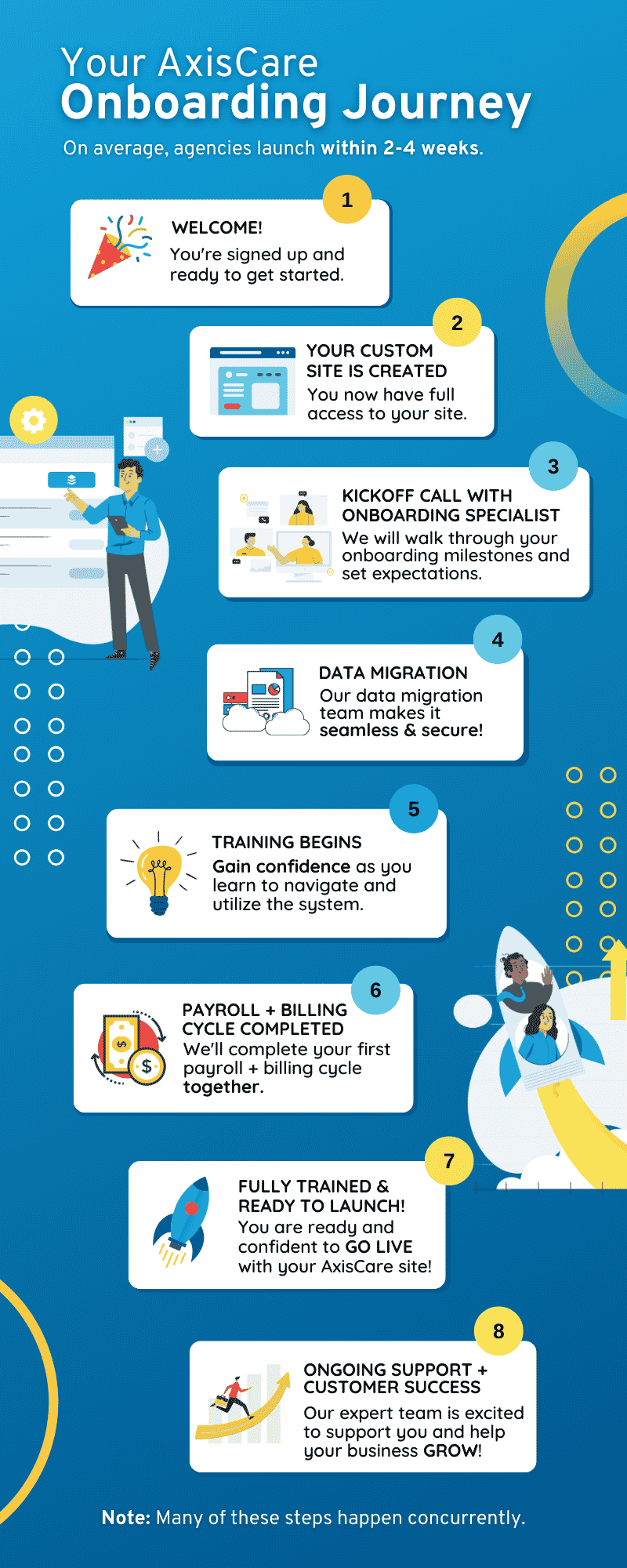
Switching to AxisCare couldn’t be easier. Our team will handle all the heavy lifting, from plugging your data directly into our system via API. While some vendors take up to six months to fully transition clients to their platform, AxisCare has been able to fully onboard agencies in as little as 45 days.
You’ll never get stuck in a ticket queue or be directed to a video library: a dedicated migration support specialist will be by your side throughout the process, guiding you through configuration and data transfer, then providing ongoing support during go-live and post-live.
Our integration marketplace makes it easy to connect our system with the tools you’re already using, including key partners like QuickBooks, CareAcademy, and Allied Screening. These integrations also reduce the amount of data that needs to be manually re-entered or maintained in separate systems, making the migration that much smoother.
Scale Agency Growth With the Right Migration Strategy
When data moves over cleanly and staff are set up to use their new system correctly, agencies gain accurate reporting, fewer manual workarounds, and a foundation that can actually scale with them. Request a free demo to learn more about AxisCare’s strengths as a partner for agencies navigating a software transition.